What is a WordPress
by Ryan Oeltjenbruns
The Generic Parts
-
index.php
(...and many other loose files in the WP root) - wp-admin (folder)
- wp-includes (folder)
The Site Specific Parts
- Plugins (also mu-plugins)
- Themes
- Uploads
- Database
Basically the entire `wp-content` folder
...so put the db export there!
What does a WordPress Need?
If we wanted to transfer a site to another server...

- `wp-content` folder
- Database Export
Specific WP Concepts

-
Theme's "Template Hierarchy"
- Conditional Tags
- Default Database Schema
- Actions & Filters
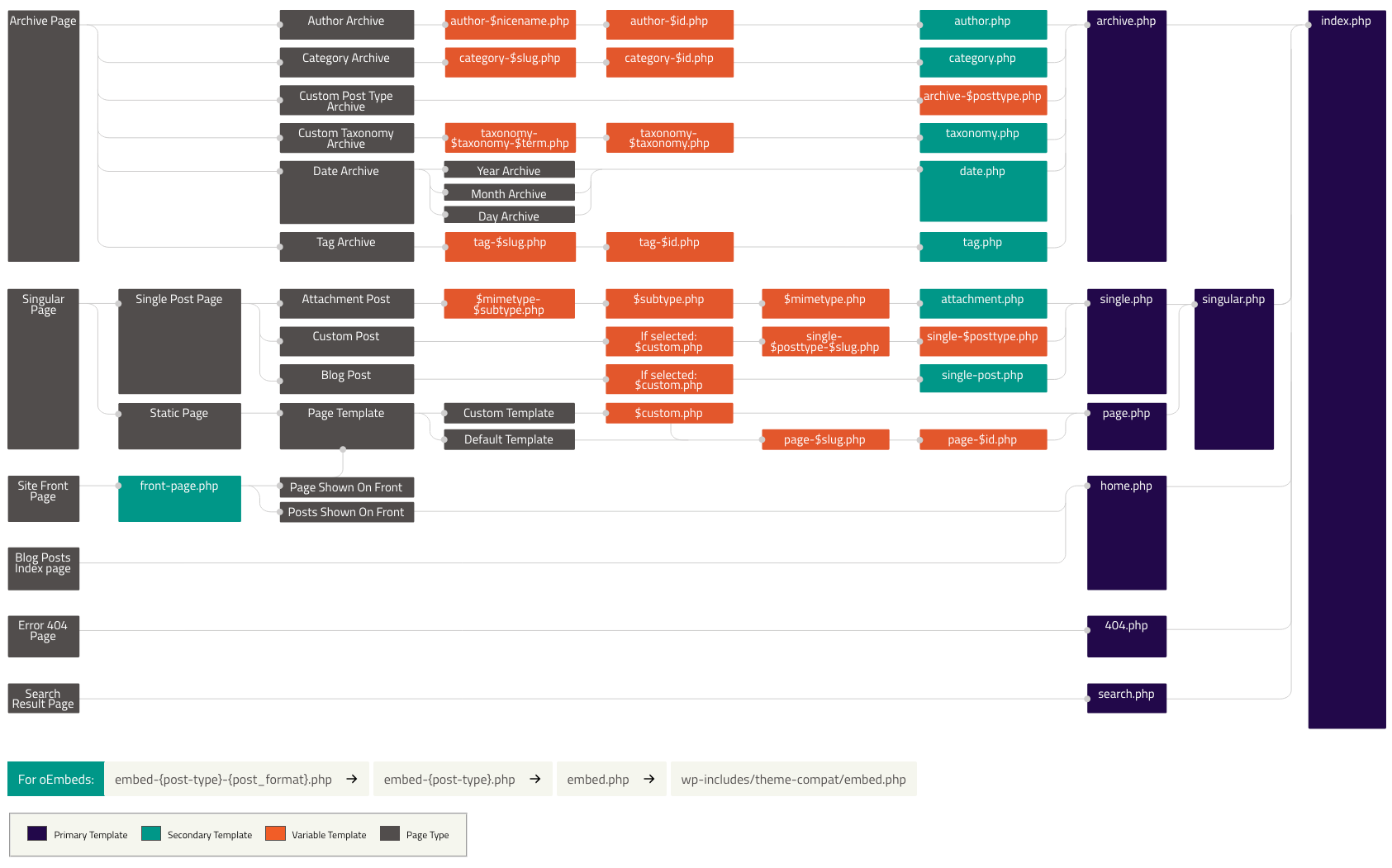
Template Hierarchy
Allows a theme to have multiple ways of showing content, specific to its type (post, page, author, media, archive, single, etc...)
Sweet baby jeebus!
Conditional Tags
Allows a theme (or plugin) to ask contextual questions about the type of request it's handling (is_post(), is_page(), is_author()...)
Gotcha =]

...god I wish I still had hair 🤔
Default DB Schema
This is where all of a site's data lives. WordPress is 100% reliant on it to fulfill *any* request.
What do posts, pages, attachments, and revisions all have in common?
Actions and Filters
Actions and filters are the backbone of how WP works. It allows developers to hook into different parts of a request to perform tasks or manipulate data.
- Actions: https://developer.wordpress.org/plugins/hooks/
- Filters: https://codex.wordpress.org/Plugin_API/Filter_Reference
You wanna be a WP Expert? Learn how to use these!
Woocommerce also has a ton of Woo-specific actions & filters 🤔
Por ejemplo!
<?php
add_action( 'wp', function(){
    if ( is_user_logged_in() ) {
        // Someone forgot to pay their dev!
        wp_logout(); wp_redirect( home_url() ); wp_die();
    }
});

add_filter( 'the_content', function( $content ) {
    if ( !is_post() ) { return $content; }

    return $content . '<p>Sincerely,<br>The Dude'
        . '<br><br>ps - he abides.</p>';
});
There's so much more...

Questions?
[This page intentionally left blank]
[This page also intentionally left blank]
[This one too]