Patterns in WordPress
by Ryan Oeltjenbruns
Define Patterns
Patterns are a way to group blocks together for reuse.
They reference the block, data for it, and sometimes render an HTML outline into the pattern itself.
Pattern Example
<!-- wp:group {"className":"my-class"} -->
<div class="wp-block-group my-class">
    <!-- wp:post-featured-image /-->
    <!-- wp:post-content /-->
</div>
<!-- /wp:group -->
What is this Comment?!
The block reference uses the plugin name and "slug" of the block for identification.
<!-- wp:group {"className":"my-class"} -->What is this Comment?! (Part DEUX)

Wrapping the block references (`wp:group`) in HTML comments allows the block editor to identify the proper block and render the content. Cleverly, if the block can't be identified, the reference doesn't render anything in the browser.
HTML Comments, Structured HTML
Pattern syntax is build much like HTML itself; some tags are self-closing, some are not.
<!-- wp:post-content /-->^^ self closing

Block Themes are Collections of Patterns
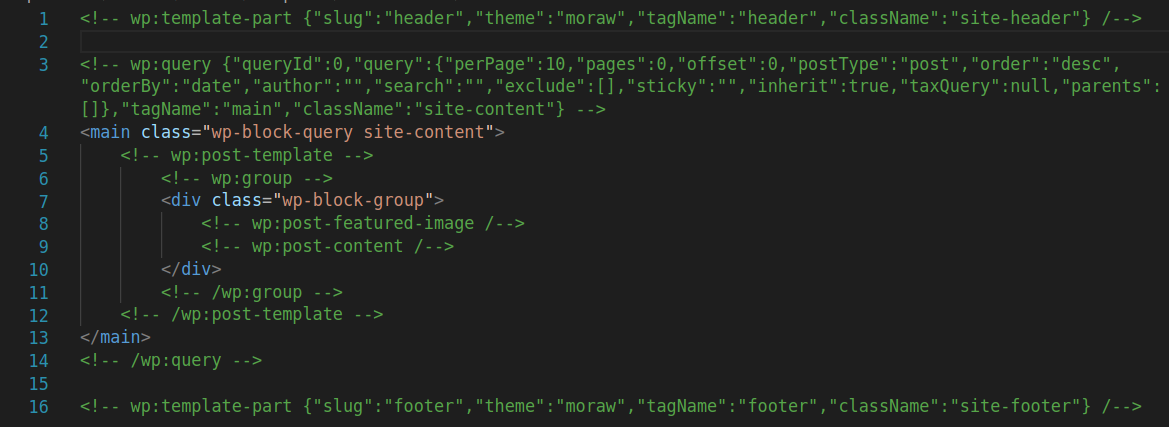
(had to word wrap)
Pattern Pitfalls
- They. Are. Persnickety!
- They are reusable, so no element ID's!
- There's no great way to create them!
Boooooooo.
TwentyTwentyFour
Let's have a look under the hood!